An AI family assistant: ask Bric, snap a letter, or connect Claude
Ask Bric, snap a newsletter, speak a reminder or connect Claude — Equal House drafts it, and you decide.
Bric is the assistant inside Equal House, and his page is the front page of the home: how the week is being shared, what is waiting for a yes and what is coming up. Ask him in plain words, or hand him a letter, a screenshot or a rota, and he drafts the events and tasks inside it — along with Magic Add, “Speak it” and a connected AI assistant such as Claude. Nothing is added to your plans until a grown-up has confirmed it.
- Bric’s page: how we’re doing
- Ask Bric
- Magic Add
- Speak it
See it in action
Magic Add: photograph the school letter
Type it or photograph it, and Equal House finds the events and tasks in a school letter, each with a name on it that you can change.
Read the transcript
Six dates buried in three paragraphs, and somebody has to read it. Or paste it in here.
One event and two tasks, out of a letter about a disco, a PE kit and reading books.
Each task comes back shared out fairly, and you can tap the name to change it.
Equal House — share the load, fairly.
Bric: how we’re doing
Bric’s page: how the week has been shared, who did what, his suggestions waiting for a grown-up, a fairer week ahead, and what he can read for you.
Read the transcript
Bric's page starts with how the week's been shared — from your tasks and calendar, not AI.
Open it for who did what over the last seven days, and how busy each day ahead looks.
A suggestion from Bric waits in the Action Inbox until a grown-up approves it.
He asks how last week felt, too. The numbers can't tell you that.
If the week ahead could be shared more evenly, he shows you the moves first.
And he can read a letter, a screenshot, an invitation or a work rota, and turn it into plans.
Equal House — share the load, fairly.
What you get
Bric’s page: how we’re doing
The Bric tab opens on the week as the Fairness Engine sees it: how it has been shared over the last 7 days, the days ahead at a glance, who is away or on nights, and what is waiting for a grown-up’s yes. It is worked out from your tasks and calendar, not by AI, so it is there on the free plan too. Suggestions arrive as cards you can approve, change or turn down on the page, and an approval can be undone for 24 hours.
Ask Bric
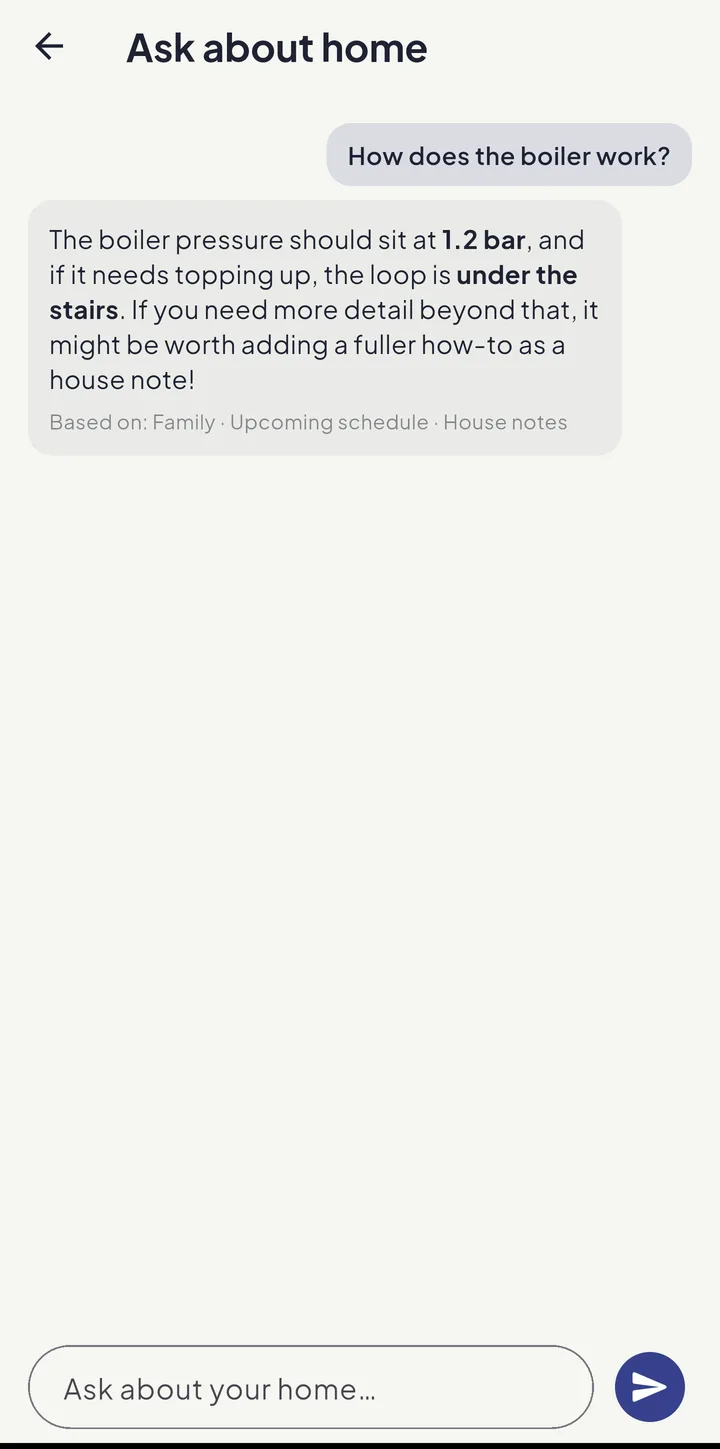
Bric, the assistant inside the app, answers from your family’s own plans, house notes and documents — who has the school run on Thursday, where the stopcock is, whose birthday is next — and checks who was at work or away before he calls a week unfair. He can suggest changes to your week, which only happen when a grown-up approves them. Part of Equal House Pro.
Magic Add
Paste text, or photograph a school letter or party invite, and Equal House reads out the events and chores hidden inside it — each one ready to keep or discard with a tick. It is the first choice under Add on the Tasks tab.
Speak it
Tap the mic and just say it — “book the dentist by Friday”, “Leo has swimming Tuesday at 5”. Your phone turns your speech into words and hands them to Magic Add to draft, so a mis-heard word can never quietly create anything. “Speak it” sits at the top of Magic Add. It is part of Equal House Pro; snapping a photo or pasting text into Magic Add is free, up to a monthly allowance.
Forward the school email
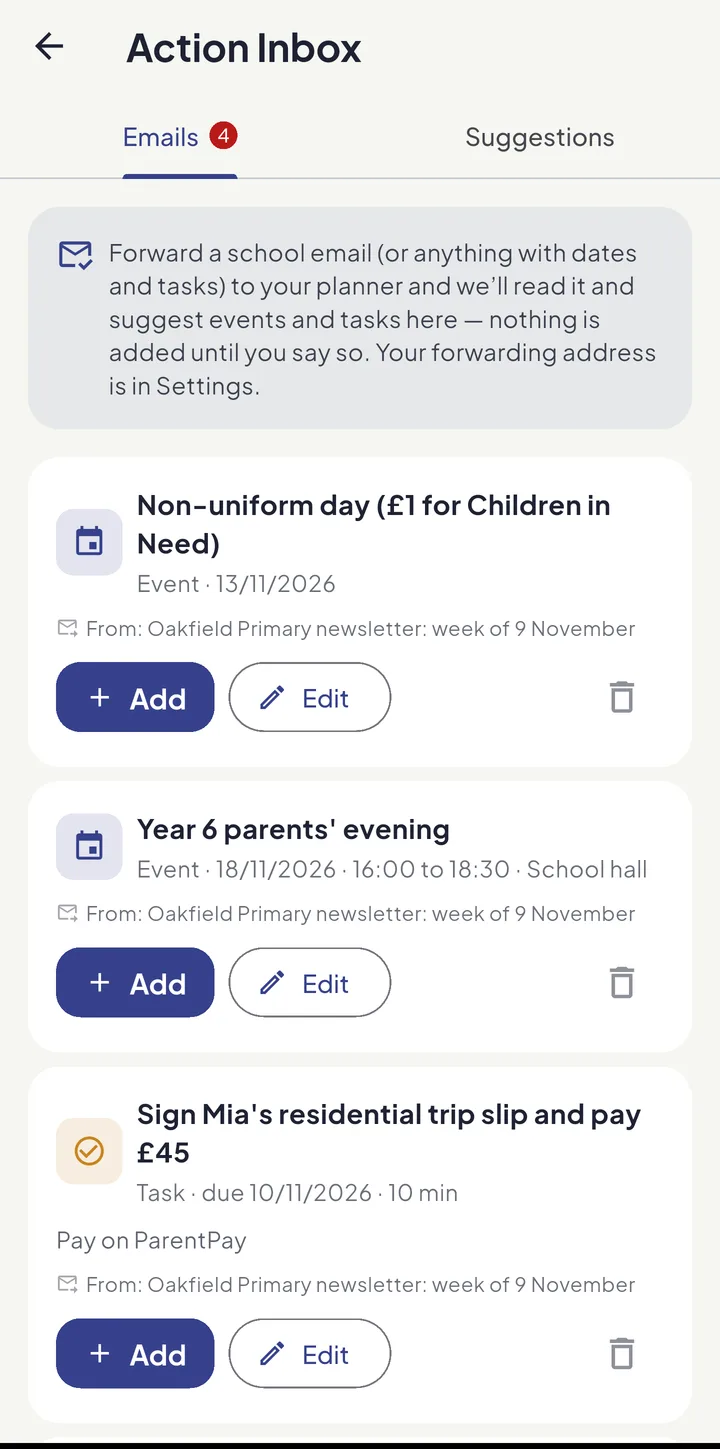
Your household has its own private forwarding address. Send it the school newsletter or the club email and the dates inside turn up in the Action Inbox, under More, as suggestions — Add, Edit or bin each one, with a warning when it looks like something already in your planner. Nothing reaches the calendar until a grown-up adds it. Part of Equal House Pro.
Connect your AI assistant
Link Equal House to Claude and other AI assistants and manage your household in plain language — “what’s Priya doing Thursday?”, “share out this week’s chores”. It’s read-only or read-and-write, you’re always asked to confirm changes, and you can revoke access anytime. Part of Equal House Pro.
Always your call
Nothing the assistant suggests is ever saved automatically. You review every event and task on screen and confirm it — the AI drafts, you decide. The one thing Bric does straight away is add to the shopping list when you ask him to.
Worked out in the UK and the EU
Bric, Magic Add, the meal planner and Safe Space’s talking points run on Amazon Bedrock, which processes each request in the UK and the EU. Only what a feature needs is sent, and no other family can see it. Each comes with a monthly allowance for your household.
How-tos and guides
Keep exploring

Share the home. Lighten the load.
Join the families using Equal House to split chores, childcare and the mental load fairly — and finally feel like a team again.


Free to start on your iPhone Free to start on your Android phone Free to start · No ads · Your family's data stays yours.