A chore chart and pocket money app for children
A board of their own where kids pitch in and earn stars and pocket money — with Bric cheering them on and a parent always in the loop.
Sharing the home means raising kids who share it too. Kid Zone turns chores and routines into stars and real pocket money — on a board of their own, with Bric cheering them on, designed to be safe for children and reassuring for parents.
- No email or password for children
- A reward chart without the pressure
- Pocket money that builds itself
- Parent approval for every chore
See it in action
Kid Zone, stars and routines
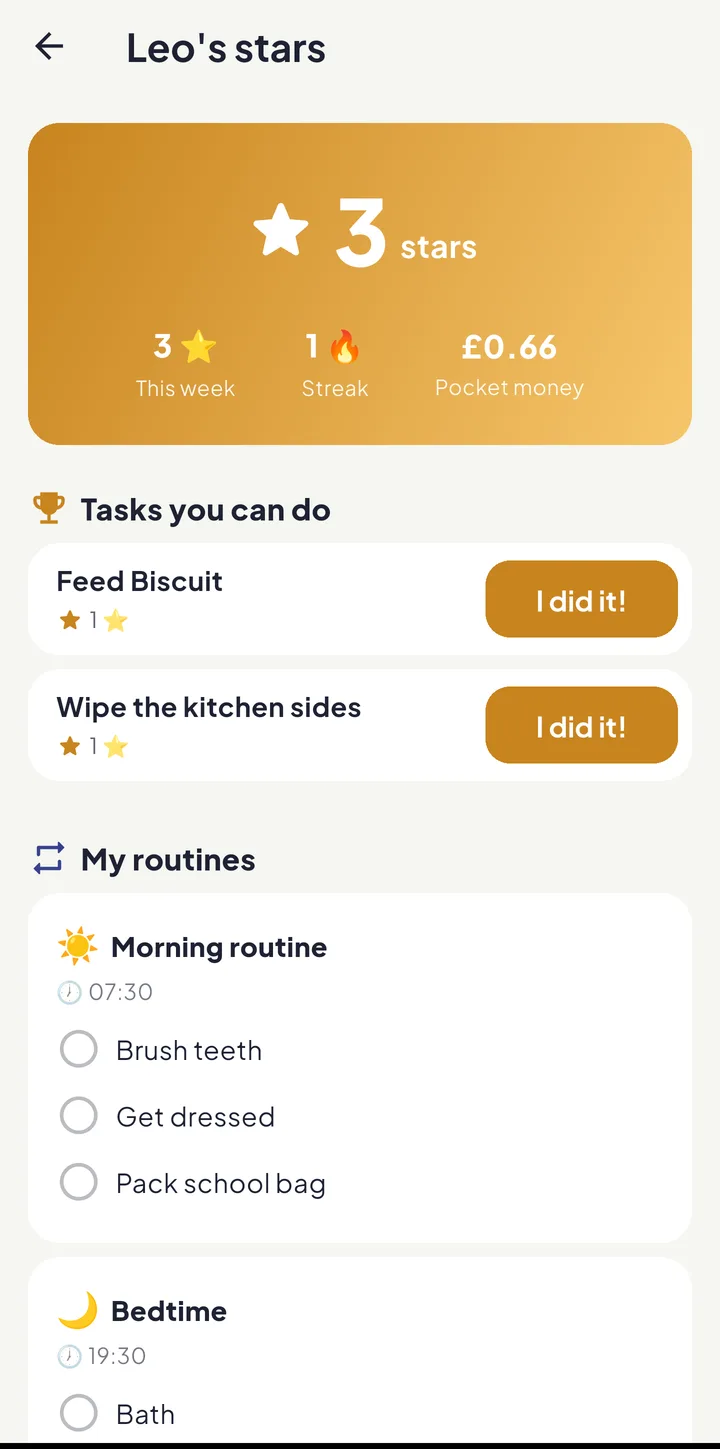
Children sign in with the family’s six emojis, or a grown-up hands over the phone; stars, pocket money and routines that pay out, and no email address.
Read the transcript
Children sign in with your family's six emojis. No email address, nothing to remember.
Or hand them your phone. Their board stays put until a grown-up takes it back.
Stars, their pocket money, and today's tasks, each with a big I did it button.
Brush teeth, get dressed, pack the school bag — and the whole routine pays out at once.
Three more stars and twenty pence, straight onto the board. And no streak to lose.
Equal House — share the load, fairly.
Pocket money and money jars
What a chore pays follows its effort, every reward can split itself between Spend, Save, Give and Invest, and Pay out pocket money records what you hand over.
Read the transcript
Leave the amount blank and a chore pays from its effort points. Or type in what it's worth.
Turn on money jars, and every reward goes into Spend, Save, Give and Invest.
Forty, thirty, twenty, ten to start with — and it has to add up to a hundred.
Pay out pocket money records what you've handed over. Half, all, or any amount.
Equal House — share the load, fairly.
What you get
No email or password for children
Kids sign in by tapping the family’s six-picture code and choosing themselves — with their own PIN, if you give them one — on a device your family has approved: a grown-up signs in on it, or sends a setup code that pairs a child’s own phone to that child, without any grown-up signing in there. No email and no password, and only a grown-up adds a child’s details. A child’s board opens on a phone or tablet, where they can hold it, rather than on a computer.
A reward chart without the pressure
Chores and routines earn stars, so helping out feels like a win rather than a chore, and the big milestones get a proper cheer. There’s no streak to keep up, so a day off ill or away costs them nothing.
Pocket money that builds itself
Put pocket money on a chore or a routine and it is paid into the child’s jars — for a chore once a grown-up confirms it, for a routine each day its last step is ticked. The board shows what each job pays, and you record a pay-out whenever you settle up. Rather they didn’t see the amounts? Switch off Pocket money on their board for that child and they see stars only, while the money still builds up for you to pay out.
Parent approval for every chore
“I did it!” sends the task to a parent for a quick yes. Stars and money for a chore are only awarded once an adult confirms. A routine pays when its last step is ticked, and unticking it that day takes it back.
Morning and bedtime routines, on a schedule
Build a routine as a short list of steps and choose the days it runs — every day, weekdays, weekends, the days you pick, the days a grown-up works, or school days that follow your school’s own calendar and skip INSET days and bank holidays. A live “Next:” line shows the coming days and anything it will skip, and Kid Planner fills in a child’s week from jobs that suit their age.
Bric on the board
Bric, Equal House’s friendly brick, says one thing at a time — how many jobs are left, that it’s nearly bedtime — and passes on a grown-up’s well done or a thank-you. Each job gets a picture chosen from its words, and a “How to do it” note can show them how.
You choose how lively it is
Set each child’s board to Lively, Calm or Quiet, or let their age decide, and turn on gentle sounds for them on Android. Open a board on your own phone and it stays theirs until a grown-up taps Hand back and unlocks it; on a child’s own phone, Change child swaps to a brother or sister with just their PIN.
Children are never in the Fairness Score
A child’s jobs are counted on their own board, as stars and pocket money, and never in the Fairness Score — that measures how the grown-ups share the home.
How-tos and guides
Keep exploring

Share the home. Lighten the load.
Join the families using Equal House to split chores, childcare and the mental load fairly — and finally feel like a team again.


Free to start on your iPhone Free to start on your Android phone Free to start · No ads · Your family's data stays yours.