Equal House, on a big screen
The same Equal House as the phone app, laid out for a computer. Plan the week at your desk with room to see it all, then put the family’s day up on a spare screen in the kitchen.
On a phone, Equal House is the app. Get it free
Room to see the whole week
A sidebar instead of tabs, and pages that use the width: lists with the detail beside them, a week you can take in at a glance. For the grown-up who does the planning at a desk.
Equal House on your computer
The same family on a bigger screen: tasks and Auto-Balance, the whole week on the calendar, the meal planner and Bric’s page, in the browser.
Read the transcript
Equal House runs in the browser on your computer too — the same family, and the same tasks.
Auto-Balance works the same way. One click, and the week is shared out.
The calendar has room for the full week, hour by hour, so the busy day stands out.
The meal planner lays the week's dinners out side by side, each with its cook.
And Bric's page shows how the week is shared, and the days ahead, all at once.
Equal House — share the load, fairly.
The week’s jobs, and the one you clicked, side by side
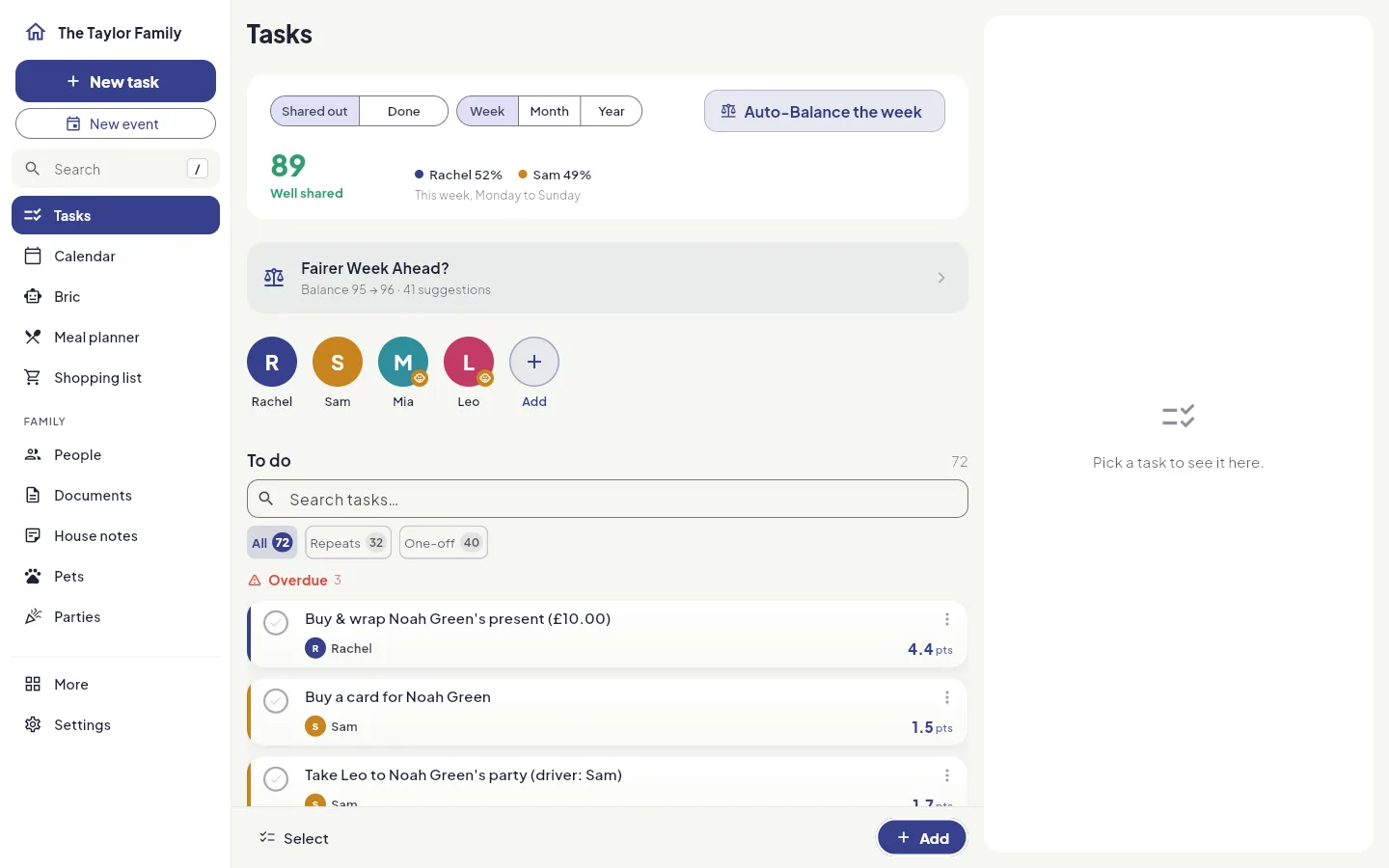
Tasks are grouped into overdue, today, tomorrow and later, under a strip showing this week’s split between the grown-ups and the Fairness Score. Click a task and it opens in a panel beside the list: who has it, when it’s due, how often it repeats and how much effort it takes. Mark it done, give it to someone else or edit it without losing your place.
A real week calendar
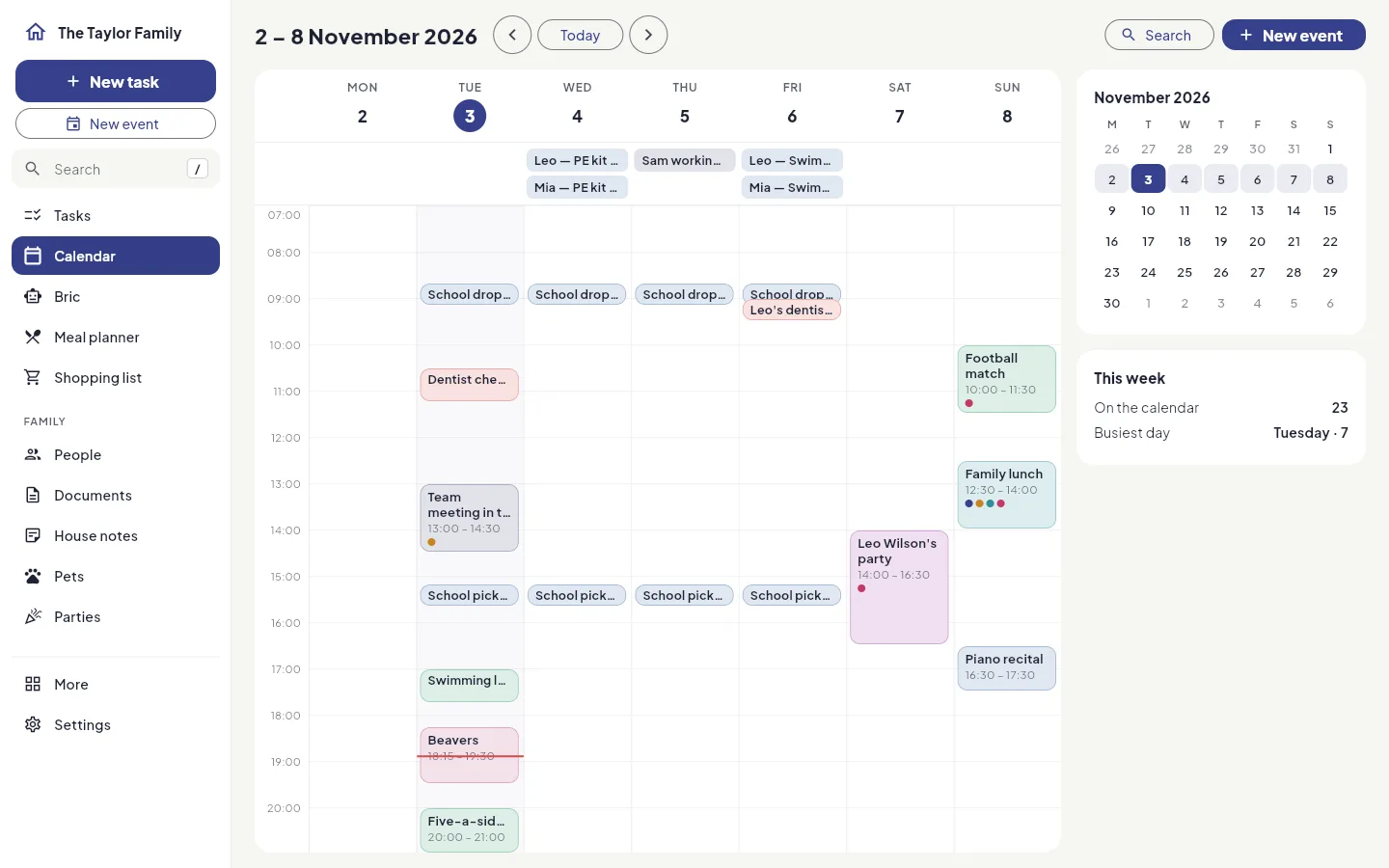
The whole week, hour by hour, with all-day events in their own row, each event in its category’s colour and tagged with who it’s for, and a line at the current time. A small month sits beside it: click any day to jump to its week. Search looks far beyond the week on screen.
A meal plan you can drag
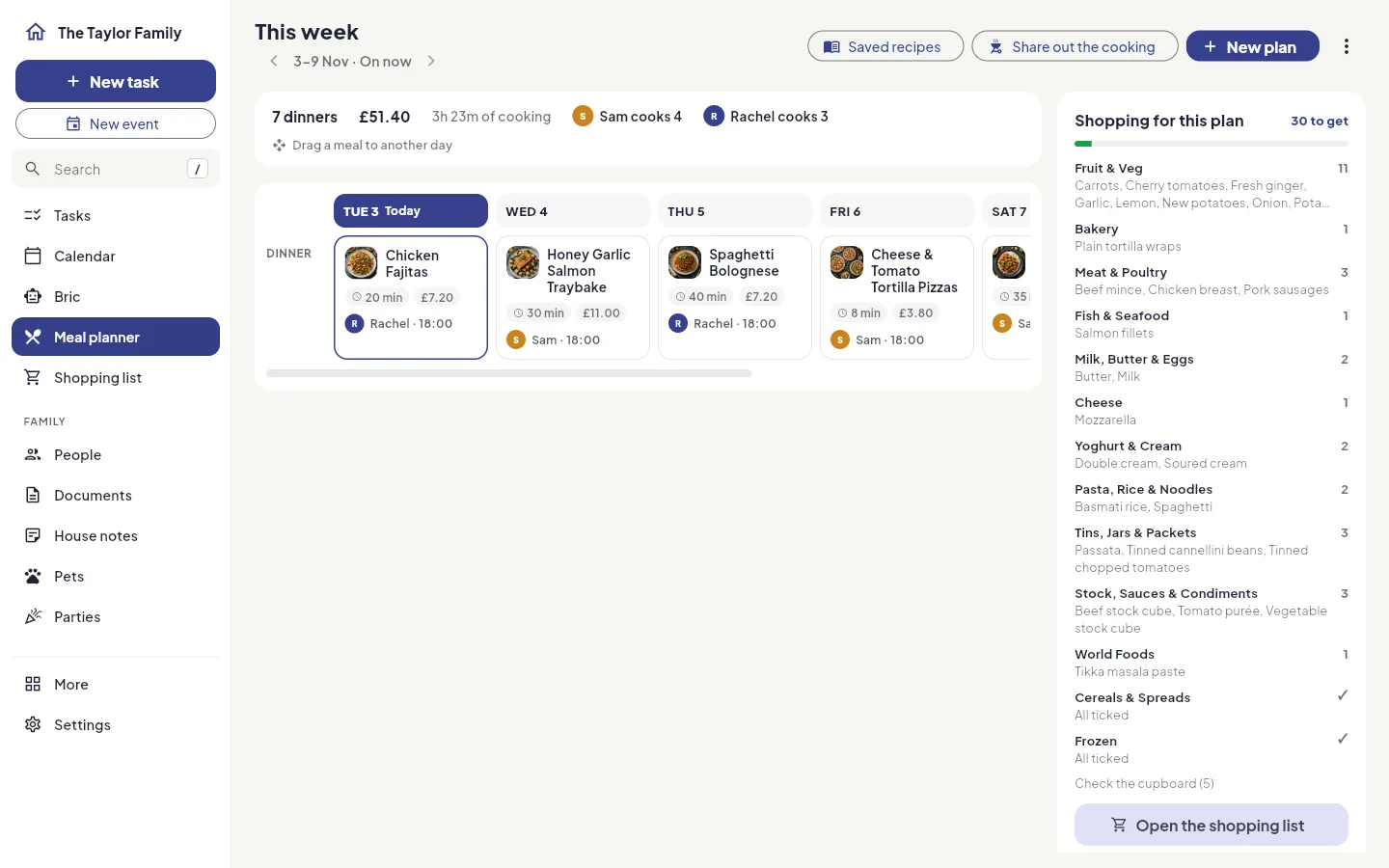
The plan is a week board, a column for each day and a row for each meal. Drag a meal to another day when plans change. The plan’s shopping sits beside it, and the shopping list is laid out in aisles, in the order you walk round a UK supermarket.
People, documents, pets and parties, two panes wide
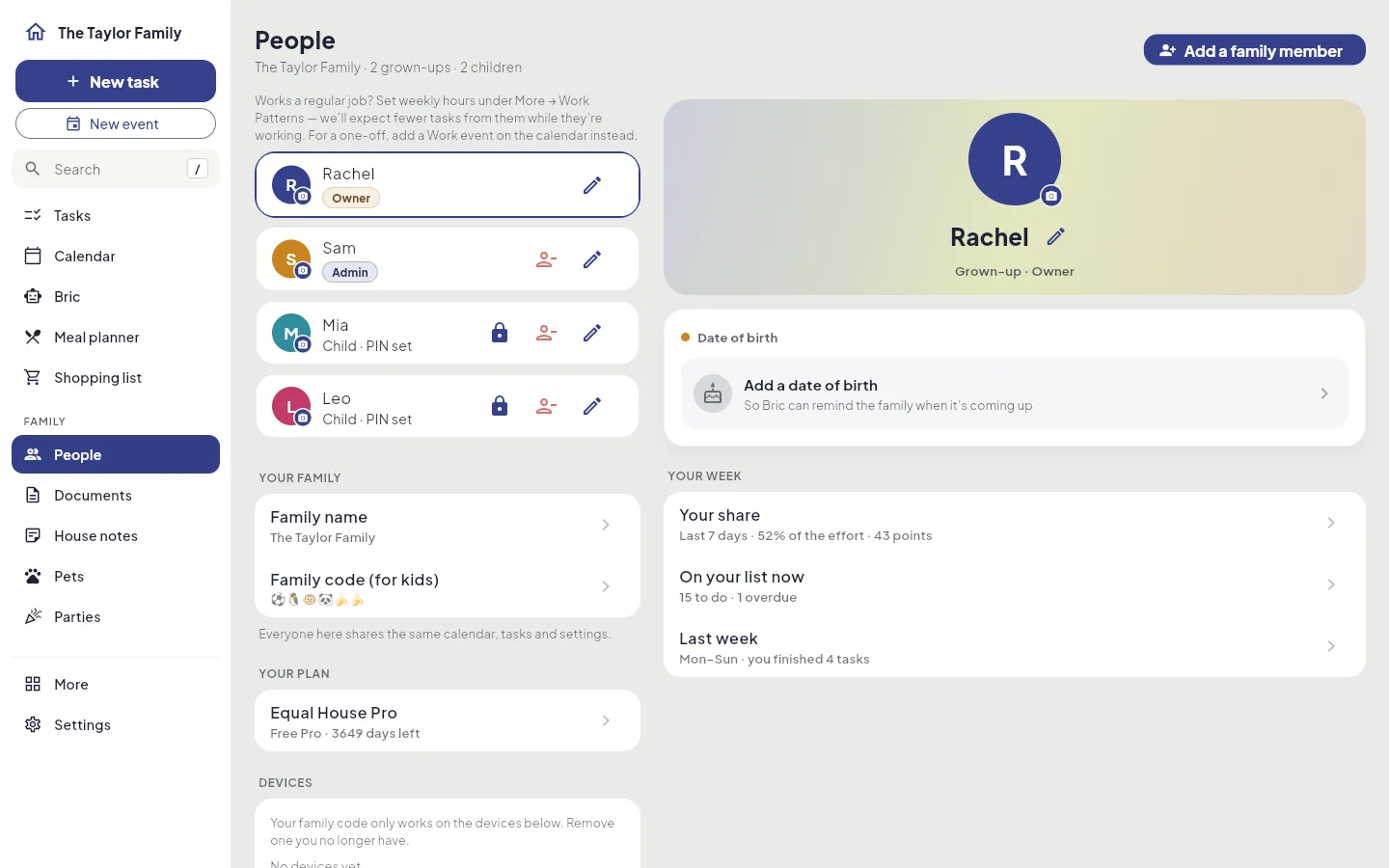
Pick a person, a document, a pet or a party and it opens beside the list, so you can work down it without going back and forth. Handy for the jobs that need a proper sit-down: the passport renewals, the vet’s details, the party list.
Bric, with the chat beside him
Bric’s page becomes a dashboard, and a conversation opens in a panel next to it instead of covering it. Bric is part of Pro.
Press “/” to go anywhere
Press / (or Ctrl K, ⌘K on a Mac) from any page and type: every screen and every setting is a few letters away. Arrow keys and Enter do the rest.
The same family, the same account
Sign in with the account you use on your phone. Anything you change on the computer is on everyone’s phone, and the other way round.
A spare screen becomes the family’s day
Put an old laptop on the kitchen side, or plug a computer into the TV, open the Family Wall, and everyone can see the day without picking up a phone.
- Today as a timeline, with a line at the current time
- Who’s doing what: a lane for each person, showing what’s done
- What’s next, with a countdown
- Tonight’s dinner
- Coming up: birthdays, parties and renewals
- The week ahead, in seven columns
It keeps itself up to date and changes nothing, so it is safe to leave running where anyone can see it.
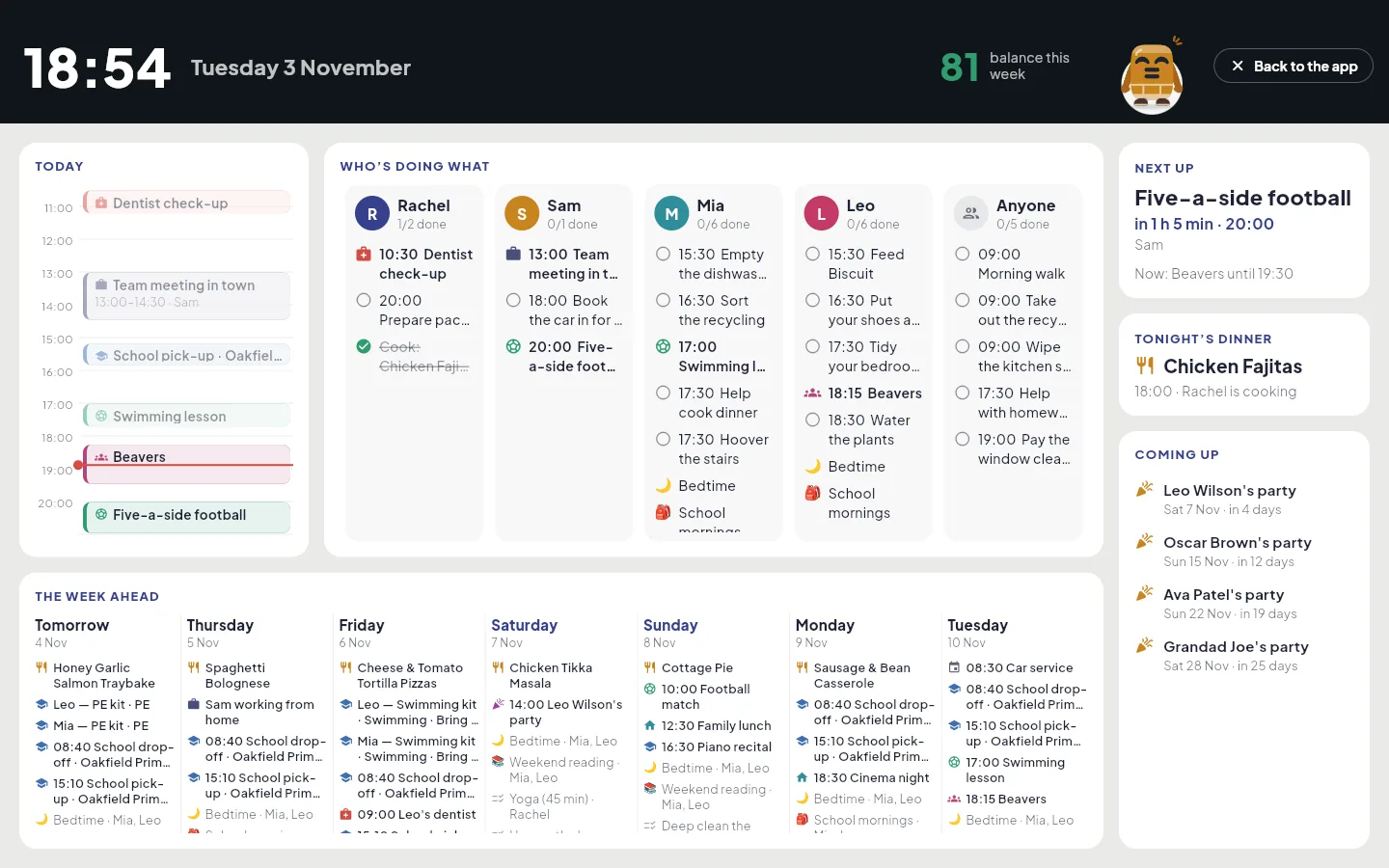
The Family Wall
A read-only day overview for a spare screen: today with a line for now, a lane for each of you, what is next, tonight’s dinner and the week ahead.
Read the transcript
Put the Family Wall on a spare screen in the kitchen, and the whole house can see the day.
Today's events run down the side, with a red line for where you are in the day.
Then a lane for each of you, children included, with what's done and what's still to do.
What's next, who's cooking tonight, and the parties coming up.
And the week ahead along the bottom, so nobody has to ask what's on.
Equal House — share the load, fairly.
Instead of a paid wall display
Wall calendars such as Skylight are good at being seen: the screen is around £290 in the UK, with a subscription on top for the fuller features. The Family Wall comes with Equal House, on the free plan too, and runs on a screen you already own. It isn’t a touchscreen made to hang on the wall, but it’s worth trying before you buy one, to see whether your family will look at it.
Get Pro on your computer
The computer has the same free plan and the same Pro as the phone, and one subscription covers your whole household on every device. Sign in with your usual account, choose a plan and pay securely with Stripe.
Pro, paid yearly
That’s £2.49 a month: two months free
Get Pro on your computerWhat Pro adds, on the phone and the computer
- Plan as far ahead as you like, everywhere — meals, parties and the calendar included
- Renewals — car insurance, the MOT and passports, on one list that shows what’s coming up
- The school run — a term runs for months, so setting up a school needs Pro
- Safe Space — raise a difficult subject calmly, in writing or a voice note
- Bric, your in-app assistant — ask about the house, or have him reorganise your week
- Forward an email straight into your planner
- Calendar Sync — show a Google, Outlook or Apple calendar in yours (read-only)
- Share your household's code with relatives, find a time & propose shared events
- Connect your AI assistant (Claude)
- “Speak it” — dictate into Magic Add
Already paying on your phone? Then you have Pro on the computer too. Prefer to start free? The free plan plans 3 days ahead, with no card and no automatic trial. Compare the plans
Questions about the computer version
Is it the same Equal House as the phone app?
Yes. It is the same app with the same family data, laid out for a bigger screen. You sign in with the same account you use on your phone, and anything you add or change on the computer shows on everyone’s phones, and the other way round.
Do I need to install anything?
No. Equal House on a computer runs in your web browser at app.equal.house. Open the address, sign in, and your family is there.
Does the computer version cost extra?
No. The same features are free or Pro on the computer as on the phone, and one subscription covers your whole household on every device. Pro is £29.90 a year, which works out at £2.49 a month, or £2.99 a month.
How do I get Pro on a computer?
Go to app.equal.house/upgrade and sign in. Choose yearly (£29.90, the best value) or monthly (£2.99) and pay securely with Stripe. If someone in your household already pays on their phone, you already have Pro on the computer: it belongs to the household, not the device.
Can I use it on my phone or tablet?
On a phone or tablet, Equal House is the app. If you open app.equal.house on one, you are taken to the App Store or Google Play instead, because the app does everything better there, from reminders to Kid Zone.
Can the children use it on the computer?
Kid Zone stays on phones and tablets, where children sign in with their picture code. On the computer the grown-ups can still see each child’s jobs and pocket money.
Will it remind me about things?
Not yet. The computer version does not send notifications, so reminders keep coming to your phone as they do now.
How do I turn a spare screen into a Family Wall?
Open app.equal.house on that computer, sign in, then open Family Wall from More (or press / and type “wall”). It fills the window with the family’s day and keeps itself up to date every few minutes. Set the computer not to go to sleep, and it stays on show.
More on the computer version
On the phone, or on the computer
Equal House is free to start on iPhone, iPad and Android, and the same account opens it on your computer at app.equal.house.


Free to start on your iPhone Free to start on your Android phone Free to start · No ads · Your family's data stays yours.